@return

Computer Repair of Des Moines

Verified Business
Computer Repair Service
Location Urbandale, IA
4.3
( 3 reviews )
Closed
โ€ข Write a Review
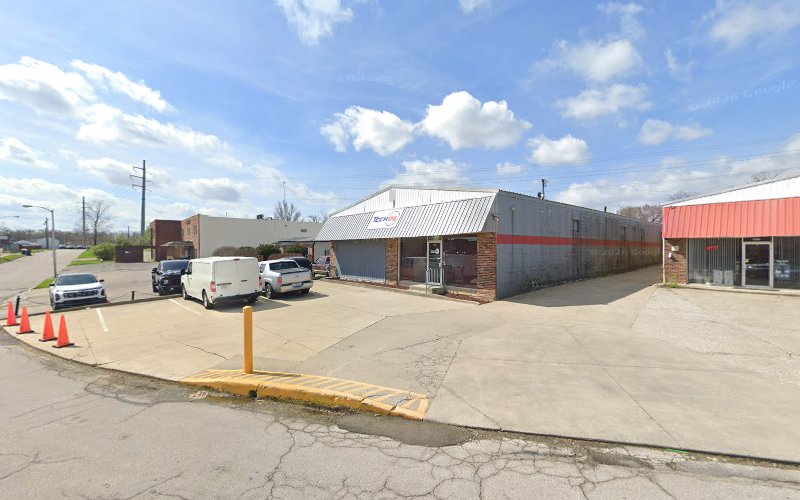
Location 4601 NW Urbandale Dr Suite 124, Urbandale, IA, 50322, United States

Hours of Operation

Closed
โ€ข Opens Monday at 8:00 AM
Sunday
Closed
Monday
8:00 AM - 6:00 PM
Tuesday
8:00 AM - 6:00 PM
Wednesday
8:00 AM - 6:00 PM
Thursday
8:00 AM - 6:00 PM
Friday
8:00 AM - 6:00 PM
Saturday (Today)
Closed

Holiday Hours: Please call ahead during holidays as hours may vary.

Featured Services

PC Repair

Mac Repair

System Security

Device Maintenance

PC Repair

No images available

Contact for Service

Mac Repair

No images available

Contact for Service

System Security

No images available

Contact for Service

Device Maintenance

No images available

Contact for Service

Frequently Asked Questions

What types of devices does Computer Repair of Des Moines service?

Computer Repair of Des Moines services both PC and Mac devices, providing repair and maintenance.

Does Computer Repair of Des Moines offer system security services?

Yes, Computer Repair of Des Moines offers system security services featuring real-time threat detection in partnership with Malwarebytes.

Where is Computer Repair of Des Moines located?

Computer Repair of Des Moines is located at 4601 NW Urbandale Dr. Suite 126, Urbandale, IA 50322.

About Computer Repair of Des Moines

Verified

Computer Repair of Des Moines is a computer repair business serving Urbandale, IA. Computer Repair of Des Moines provides PC and Mac repair services, system security with real-time threat detection in partnership with Malwarebytes, specialized Mac repair, and device maintenance including junk file removal, performance tuning, and physical cleaning. Suite 126. Computer Repair of Des Moines features skilled technicians and supports a wide range of tech gadgets and components.

Customer Reviews

4.3
3 reviews
J

Jahan Hamilton

Jan 19, 2026
5.0

Even though my computer was beyond repair, everyone was super accommodating and they did everything they could to try and fix it. Very pleased with their services and will be returning with any future needs.

C

Carsen Buonantony

Aug 1, 2025
5.0

My boyfriend came in to get his PC repaired as every single game he would attempt to play would crash. This store was so quick and had amazing customer service. When I tell you this PC crashed EVERY. SINGLE. TIME. he tried to playing ANYTHING, I mean it. The kicker was, that everything was fully upgraded and it still wouldnโ€™t work. This amazing team figured it out in a day. If you ever have any needs electronic wise, this is the place to go!

S

Sydney T

Jul 24, 2025
3.0

I wish that I didnโ€™t feel this way about this place now. They helped my desktop PC when it faced issues on Christmas Eve quite a few years back. However recently, I had to take the same desktop PC back due to it only ever loading up in BIOS with a โ€œPlease enter setup to recover BIOS setting. After setting up Intel(R) Optane Memory or the RAID configuration was built, SATA Mode Selection must be changed to RAID mode to avoid unknoun issues. Press F1 to Run SETUPโ€ failure and trying to look it up on my own. Went back three times for the same problem because on their end they couldnโ€™t replicate the error after they forced it out of BIOS. Thankfully, only paid the one time as the first time didnโ€™t fix the issue. On the third attempt, brought my USB devices for them to use them individually to try and replicate the issue. One thing found was my keyboard was causing a certain error where it would also say I had two mice and three keyboards hooked up. Even without, it still errored into BIOS for me. Was taught how to bypass BIOS and turn off BIOS triggering altogether. But, they were not able to fix the issue that was triggering BIOS in general. Left unsatisfied without a true outcome and was told they would have to start replacing parts/I should start with replacing the motherboard/I should consider a brand new build, just to see if maybe the error would stop. Having no resolution was disappointing, especially with what I found out later. I went somewhere else to have my laptop fixed at a super reasonable price, also discussed the issue with my desktop. They told me to try uninstalling my keyboard/mice drivers which I hadnโ€™t thought of before and wasnโ€™t suggested by Computer Repair of Des Moines. It did not work but I appreciated the idea. Eventually, looked up the error again, adding the multiple mice and keyboard issue, and found a Reddit post rather quickly about people with the same issue. Was instructed to change the watch (CMOS) battery in my desktop PC as a dead one can trigger the error. After replacing, my desktop PC works as fine as it did before the issue, no multiple mice/keyboard problems either. Iโ€™m very disheartened that after spending as much as I did at this place, they couldnโ€™t take a moment like I had to look it up on their end when all it was was a dead watch battery. Then to be suggested to spend even more money on parts that they didnโ€™t even know would fix the issue. Fixed my desktop by myself, please save your money and try looking up resources on your own first as I will be trying harder next time I have PC/Laptop issues. The stars are due to my disappointment in service that expensive, but not 1 star because the people were very polite to me. Sorry guys, I wonโ€™t be coming back. EDIT: Companyโ€™s response as I believe editing a review can delete responses. โ€œHi Sydney, Thank you for taking the time to share your experience. We truly value your feedback. We're very sorry to hear that you left feeling disappointed after trusting us again with your PC. During diagnostics, the problem presented intermittently. The system booted normally several times in our shop, which made pinpointing the root cause more difficult. We did test and replace the CMOS battery at one point, but the issue still resurfaced, leading us to believe it could be related to a larger hardware concern. We're glad you were eventually able to find a resolution, and we appreciate you acknowledging the politeness and effort from our team. While the outcome wasn't what any of us hoped for, we'll take your comments to heart and continue working to improve our diagnostic processes. We wish you the best with your system and hope you'll consider us again in the future.โ€ Since I cannot reply to a response, I want to say thank you for your cordial message. I apologize, I am not sure what would be the reason for your CMOS replacement to not have worked for my PC. But, I had no issues after my replacement of the watch battery. Everyone was truly kind and nice to me, Iโ€™m sorry my feelings about the service is so low. Realizing 2 โญ๏ธs is harsh.

4.3

Based on 3 reviews

J

Jahan Hamilton

Jan 19, 2026
5.0
Even though my computer was beyond repair, everyone was super accommodating and they did everything they could to try and fix it. Very pleased with their services and will be returning with any future needs.
C

Carsen Buonantony

Aug 1, 2025
5.0
My boyfriend came in to get his PC repaired as every single game he would attempt to play would crash. This store was so quick and had amazing customer service. When I tell you this PC crashed EVERY. SINGLE. TIME. he tried to playing ANYTHING, I mean it. The kicker was, that everything was fully upgraded and it still wouldnโ€™t work. This amazing team figured it out in a day. If you ever have any needs electronic wise, this is the place to go!
S

Sydney T

Jul 24, 2025
3.0
I wish that I didnโ€™t feel this way about this place now. They helped my desktop PC when it faced issues on Christmas Eve quite a few years back. However recently, I had to take the same desktop PC back due to it only ever loading up in BIOS with a โ€œPlease enter setup to recover BIOS setting. After setting up Intel(R) Optane Memory or the RAID configuration was built, SATA Mode Selection must be changed to RAID mode to avoid unknoun issues. Press F1 to Run SETUPโ€ failure and trying to look it up on my own. Went back three times for the same problem because on their end they couldnโ€™t replicate the error after they forced it out of BIOS. Thankfully, only paid the one time as the first time didnโ€™t fix the issue. On the third attempt, brought my USB devices for them to use them individually to try and replicate the issue. One thing found was my keyboard was causing a certain error where it would also say I had two mice and three keyboards hooked up. Even without, it still errored into BIOS for me. Was taught how to bypass BIOS and turn off BIOS triggering altogether. But, they were not able to fix the issue that was triggering BIOS in general. Left unsatisfied without a true outcome and was told they would have to start replacing parts/I should start with replacing the motherboard/I should consider a brand new build, just to see if maybe the error would stop. Having no resolution was disappointing, especially with what I found out later. I went somewhere else to have my laptop fixed at a super reasonable price, also discussed the issue with my desktop. They told me to try uninstalling my keyboard/mice drivers which I hadnโ€™t thought of before and wasnโ€™t suggested by Computer Repair of Des Moines. It did not work but I appreciated the idea. Eventually, looked up the error again, adding the multiple mice and keyboard issue, and found a Reddit post rather quickly about people with the same issue. Was instructed to change the watch (CMOS) battery in my desktop PC as a dead one can trigger the error. After replacing, my desktop PC works as fine as it did before the issue, no multiple mice/keyboard problems either. Iโ€™m very disheartened that after spending as much as I did at this place, they couldnโ€™t take a moment like I had to look it up on their end when all it was was a dead watch battery. Then to be suggested to spend even more money on parts that they didnโ€™t even know would fix the issue. Fixed my desktop by myself, please save your money and try looking up resources on your own first as I will be trying harder next time I have PC/Laptop issues. The stars are due to my disappointment in service that expensive, but not 1 star because the people were very polite to me. Sorry guys, I wonโ€™t be coming back. EDIT: Companyโ€™s response as I believe editing a review can delete responses. โ€œHi Sydney, Thank you for taking the time to share your experience. We truly value your feedback. We're very sorry to hear that you left feeling disappointed after trusting us again with your PC. During diagnostics, the problem presented intermittently. The system booted normally several times in our shop, which made pinpointing the root cause more difficult. We did test and replace the CMOS battery at one point, but the issue still resurfaced, leading us to believe it could be related to a larger hardware concern. We're glad you were eventually able to find a resolution, and we appreciate you acknowledging the politeness and effort from our team. While the outcome wasn't what any of us hoped for, we'll take your comments to heart and continue working to improve our diagnostic processes. We wish you the best with your system and hope you'll consider us again in the future.โ€ Since I cannot reply to a response, I want to say thank you for your cordial message. I apologize, I am not sure what would be the reason for your CMOS replacement to not have worked for my PC. But, I had no issues after my replacement of the watch battery. Everyone was truly kind and nice to me, Iโ€™m sorry my feelings about the service is so low. Realizing 2 โญ๏ธs is harsh.

No photos yet

Be the first to share photos of this business!

Login Required

Please login to upload photos

You need to be logged in to upload photos to this business.

No Videos Available

This business hasn't shared any videos yet. Check back later for new content.

No Updates Yet

This business hasn't posted any updates yet. Check back later for news, promotions, and announcements.

๐Ÿ›๏ธ

No products available

This business hasn't listed any products for sale yet.

Services & Offerings

4 services

Discover the professional services offered by Computer Repair of Des Moines. Contact the business for bookings and inquiries.

๐Ÿฝ๏ธ

No menu items available

This business hasn't added any menu items yet. Check back later for delicious food options.

Frequently Asked Questions

3 Questions

Find answers to common questions about Computer Repair of Des Moines.

What types of devices does Computer Repair of Des Moines service?

Computer Repair of Des Moines services both PC and Mac devices, providing repair and maintenance.

Does Computer Repair of Des Moines offer system security services?

Yes, Computer Repair of Des Moines offers system security services featuring real-time threat detection in partnership with Malwarebytes.

Where is Computer Repair of Des Moines located?

Computer Repair of Des Moines is located at 4601 NW Urbandale Dr. Suite 126, Urbandale, IA 50322.

No Amenities Available

This business hasn't added any amenities or features yet. Check back later for updates.

No Job Openings Available

This business doesn't have any job openings at the moment. Check back later for new opportunities.

Location

Loading map...

4601 NW Urbandale Dr Suite 124, Urbandale, IA 50322

Review Photo

Customer Image

Review Photo

Review Caption